

If you’ve connected Hulu with your Facebook account, then by default, you are sharing your comments, ratings, reviews, discussion forum posts and favorites with everyone. If you are uncomfortable with these settings you can turn some or all of them off and dial down the audience on your comments and favorites to just your friends.
1. Go to Hulu (or Hulu Plus) and login to your account.
2. Go to the upper-right corner of the page and click your name with the drop down arrow next to it. Select Privacy & Settings from the resulting menu.
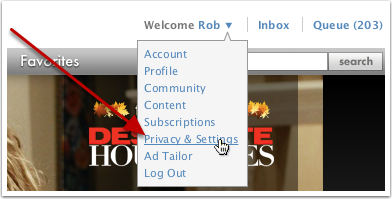
3. To make changes to the privacy settings, you need to input your password.
4. Scroll down to the Sharing What You Do on Hulu section.
5. The Hulu activities of Commenting, Ratings, Reviews, Discussion Forum Posts and Favorites are set to publish to Facebook. To disable an activity from being published to Facebook, uncheck the corresponding Facebook checkbox to the right of the activity.
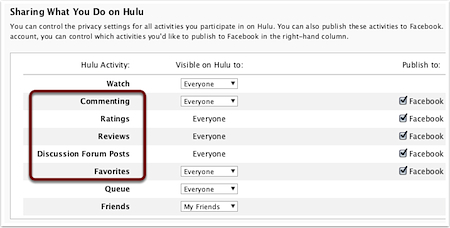
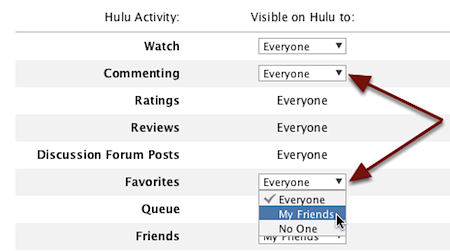
Ratings, Reviews and Discussion Forum Posts can only be turned on and off, you cannot select the level of audience you wish to see these activities. Commenting and Favorites can be changed, the options are Everyone, My Friends, and No One.
6. After making your changes, click the Save button located at the top (and bottom) of the page.




