
OS X Lion: Restore the Status Bar in Finder

By default, Lion has the Status Bar in Finder disabled. If you are used to using the Status Bar to tell you how much room is left on your drive, how many items are in a folder, etc. then you can enable it.

1. Open Finder.

2. Go to the menu, click View and select Show Status Bar.
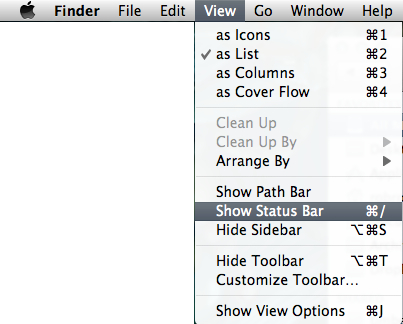
TIP: You can also toggle Finder's Status Bar by using the keyboard combination of Command + /.


 

About Rob Rogers

Once a prolific author here on Tech-Recipes, Rob has moved on to greener pastures.
View more articles by Rob Rogers

The Conversation

Follow the reactions below and share your own thoughts.

2 Responses to “OS X Lion: Restore the Status Bar in Finder”

  1. December 16, 2011 at 5:47 pm, jdcb42 said:

    Hooray!! This has been driving me insane for ages! Thank you.

    Reply

  2. December 22, 2011 at 11:23 am, Jason said:

    That option is grayed out?

    Reply

Leave a Reply

You may also like-

OS X Lion: Change Finder's New Window Default DirectoryBy default, OS X Lion has all new Finder windows open to All My Files. If you don't utilize this as much as you ...


