
Hotmail: Change account password

If you are afraid that someone else knows your password or you just want to follow the smart practice of changing your password periodically to maintain the security of your account, here’s how to do it in Windows Live Hotmail.

1. Log in to your Hotmail account.

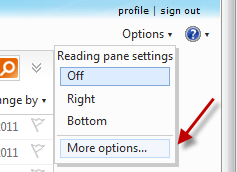
2. Go to Options -> More options…
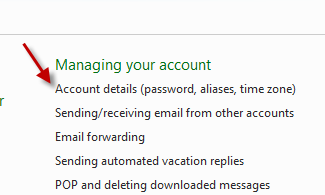
3. Click on the Account details (password, aliases, time zone) link under Managing your account section.
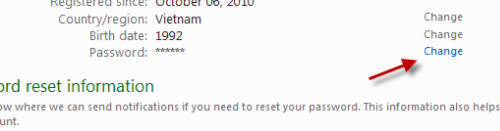
4. Click Change in the Password line.
5. Provide your old and new password in the appropriate fields.
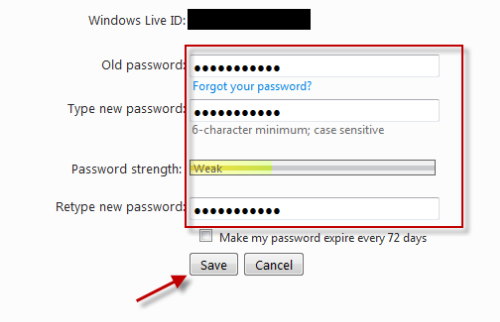
6. Hit the Save button.


 

About Lê Hoàng

When not creating exciting new Android games, Lê Hoàng is here crafting tutorials, tweaks, and fixes for your enjoyment.
View more articles by Lê Hoàng

The Conversation

Follow the reactions below and share your own thoughts.

2 Responses to “Hotmail: Change account password”

  1. August 29, 2011 at 9:34 am, Chau N. said:

    The tips are useful, but do you have any advices on cancel a hotmail account without able to sign into the hotmail? Because I think my hotmail acouunt was hacked. Thank you so much.

    Reply

  2. February 12, 2012 at 5:55 am, Tanveer said:

    It is too difficult b’coz i cant close/change my account Make it easy!!

    Reply

Leave a Reply

You may also like-

Hotmail: Change the security questionIf you have used Hotmail for a long time, maybe you have forgotten the answer to your security question. Although the security question may ...


