
Windows 7: Pause the Blue Screen Of Death (BSOD)
The Blue Screen Of Death (BSOD) is the nightmare of every Windows user. When it appears, many users may want to write down the error code to troubleshoot the problem. Unfortunately, the system will be restarted automatically in most cases, so you may have no idea what the error code is. Here is how to pause the screen when your computer has BSOD to make troubleshooting your system easier. This method works with other system failures as well.
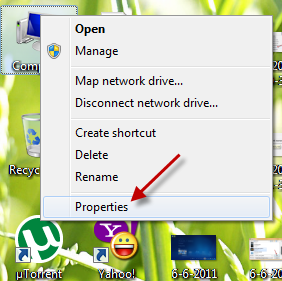
1. Right click on Computer -> Properties.
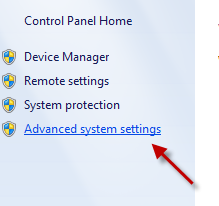
2. In the System window, go to Advanced system settings.
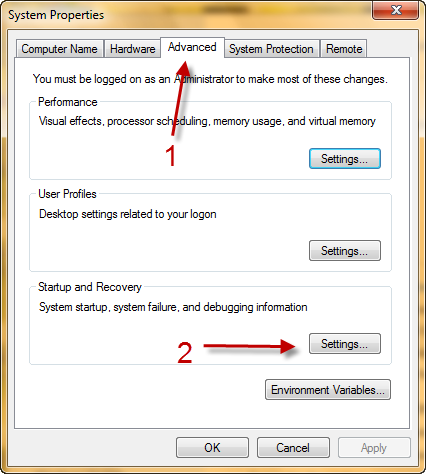
3. When the System Properties window pops up, switch to Advanced tab -> Settings (under Startup and Recovery)
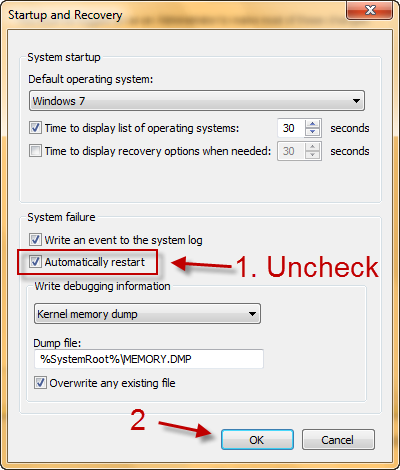
4. Uncheck Automatically restart (under System failure) and hit OK.
About Lê Hoàng
When not creating exciting new Android games, Lê Hoàng is here crafting tutorials, tweaks, and fixes for your enjoyment.
View more articles by Lê Hoàng
The Conversation
Follow the reactions below and share your own thoughts.


June 08, 2011 at 6:08 pm, Oren Tal said:
but I don’t have the computer icon?!
June 08, 2011 at 10:55 pm, Anonymous said:
You can always access it by clicking Windows Orb -> Right click on Computer -> Properties ( http://www.tech-recipes.com/wp-content/uploads/6-9-2011-5-44-27-AM.png )
Hope this helps
March 06, 2012 at 10:04 pm, drake said:
everytime I uncheck it, the check always comeback later from checking.. why can’;t i uncheck it?? sorry for my bad english



