

New users to a Windows Phone device often get confused on how to move photos from their mobile device to their mac computer. These directions should work with both Windows Phone versions 7 and 8.
Apple’s computers do not recognize WP7 devices without additional software. Luckily, you can easily download the Windows Phone Connector Software from the app store.
Once the application is installed, click it from the dock to start it.
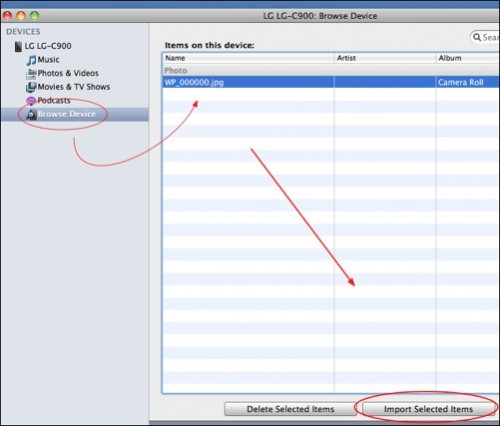
The pictures on your phone may automatically sync once you run the application. If you want to manually move pictures over, follow these steps:
1. Click Browse Device
2. Select the photos you wish to copy
3. Click Import Selected Items
4. Your pictures will be imported into iPhoto
By design the connector software will attempt to copy images over automatically whenever you connect your device. Moving images to and from the SD card is possible. It will attempt to sync your music and video files. The app will allow you to see how much space your Windows Phone device has free.
By installing this software through the mac app store, you will receive frequent updates and bug fixes automatically. Since having it installed, I have noticed several updates and new features.




