
How to Install OS X Lion Server

OS X server is now bundled as a optional install with OS X Lion. Here is how to find and install it.


The rumor that the “server” version of OS X will now be bundled with 10.7 Lion has turned out to be true. Several people have had difficulty in finding it. Here is how to install the server version:

1. Open the OS X Lion install application
2. Start the install process
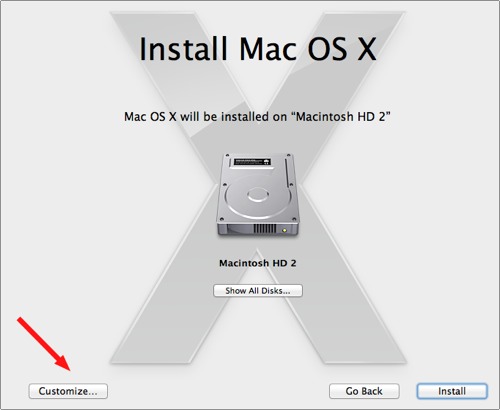
3. When you get to the following Install Mac OS X screen, select the Customize… button
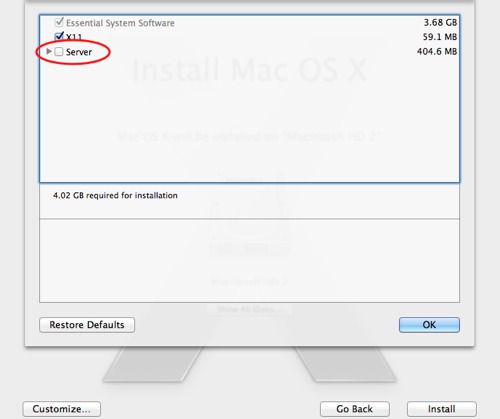
4. Select Server and the associated options and continue with your installation.
 

About David Kirk

David Kirk is one of the original founders of tech-recipes and is currently serving as editor-in-chief. Not only has he been crafting tutorials for over ten years, but in his other life he also enjoys taking care of critically ill patients as an ICU physician.
View more articles by David Kirk

The Conversation

Follow the reactions below and share your own thoughts.

3 Responses to “How to Install OS X Lion Server”

  1. May 07, 2011 at 5:46 pm, Alebe95 said:

    How did you do this? i’ve got the developer Preview 2 and i did not had the chance to choose “Customize” :(

    Reply

  2. May 07, 2011 at 8:14 pm, Alexander Burgdorf said:

    I got the Developer Preview 2, but in the installer i did not have the ‘customize’ button. How do i install Lion Server??

    Reply

  3. June 18, 2011 at 1:12 am, Gabe Renfro said:

    the server packages are only on the first developer preview

    Reply

Leave a Reply

You may also like-

Convert OS X Lion DMG Installer to a Bootable USB Thumb DriveThis recipe will explain how to make a USB Thumb Drive bootable with the OS X Lion Developer Preview installer on it and in ...



