
Lion Mail 5.0: Use Classic 4.x Layout
Posted by David Kirk in Apple Mac
Apple’s Mail has been upgraded to version 5 with Lion. This allows threaded conversations and multiple other design enhancements. If you dislike the new Mail appearance, you can easily switch back to the old, familiar look and feel of Snow Leopard’s Mail.
I absolutely love OS X Lion’s upgrades to Mail. Threaded conversations are wonderful, for example.
However, if you do not like the new design, you can make the Lion version of Mail look exactly like Snow Leopard’s version.
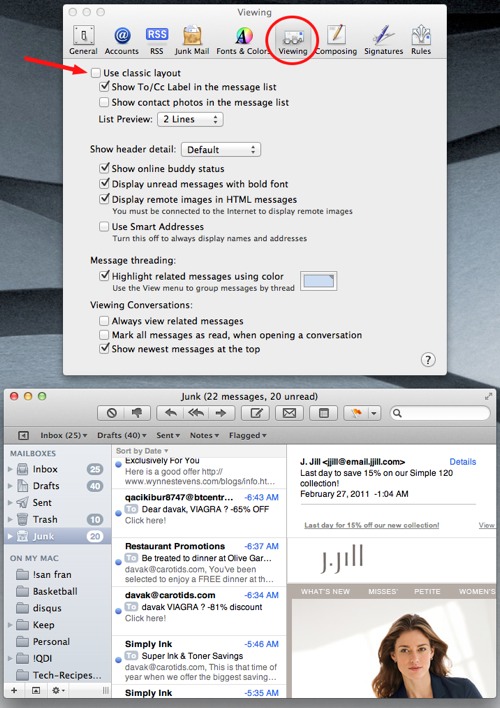
1. From Mail’s Menu select Preferences
2. Select the Viewing tab
3. Check Use classic layout
Default new layout:
Old Mail layout:
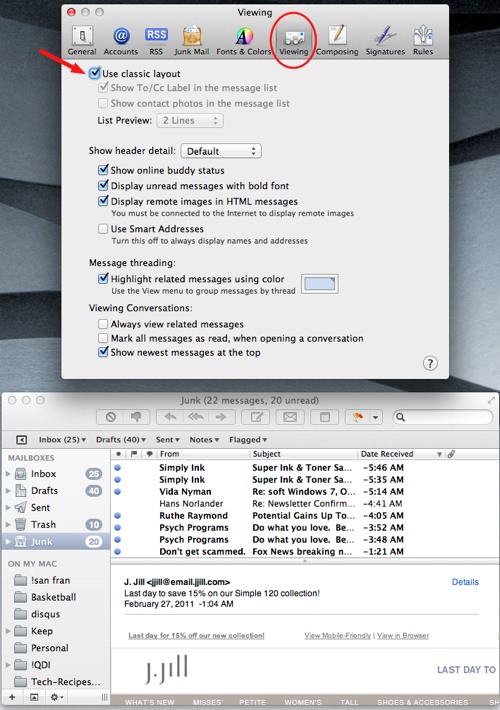
These directions just change the appearance of the new Mail application. This should not be confused with using the old Mail app completely which can be performed via Preferences -> General -> Default email reader.
About David Kirk
View more articles by David Kirk
The Conversation
Follow the reactions below and share your own thoughts.


April 30, 2011 at 8:57 pm, Cprblk said:
I know this is old, but I just stumbled onto it.
Is it possible to set that middle column to be No Preview and No To/CC so it’s just a list of senders?
Thanks.
May 01, 2011 at 11:54 am, Anonymous said:
We monitor all comments and articles so nothing is really old to us.
I don’t quite understand your question. I think you are asking if under the new layout, you can change what is displayed in the list of email messages (or middle column in the pic above).
You can remove the “cc” or “to” label but not the actual information. You can also compress the list preview down to one line only. The preview in the middle column above shows 2 preview lines…
Does that answer your question?
May 01, 2011 at 3:59 pm, Cprblk said:
What I was trying to ask is whether that middle column can be reduced to 1 line overall. Ideally with the information that is on the 1 line of the Classic Layout (Subject/Sender/Date). Pretty much like what Letterbox offers now.
I’m getting more and more disappointed that Apple comes out with these designs that waste so much space. It’s kind of silly to only have such a small number of emails (depending on your screen resolution) showing at a glance. And look at the waste of space below “Click Here”! What’s up with that?
Sorry if I wasn’t clear and I appreciate you posting back!
May 02, 2011 at 12:32 pm, Anonymous said:
Yeah, I got you. I think with the new layout you are limited to the fatter rows. I’ll try to assume Apple’s reasoning, that with threads you need the additional information to keep it from being confusing.
To be honest, 99% of the time I love Apple’s designs. However, that other 1% they make some really, really odd design choices.
July 22, 2011 at 2:57 am, Anonymous said:
I’m having a bit of trouble: doing as you say gave Mail the *look* of the old version, but it’s still grouping messages by conversation rather than laying them out strictly by time as I want it to. There’s instead a triangle, like in Finder’s list view, to click to see the individual messages. How do I change that, please?
July 25, 2011 at 4:58 pm, Anonymous said:
Mail Menu -> View -> Uncheck Organize By Conversation
July 25, 2011 at 7:41 pm, Anonymous said:
Thanks; I’d thought this thread was dead or I’d have come back and say I’d found out about that.
It does seem wrong, though, that they make you do it separately for every single folder. Still, in a way it makes sense, as you might want some sorted that way and not others.
July 25, 2011 at 7:41 pm, Anonymous said:
Thanks; I’d thought this thread was dead or I’d have come back and say I’d found out about that.
It does seem wrong, though, that they make you do it separately for every single folder. Still, in a way it makes sense, as you might want some sorted that way and not others.
July 25, 2011 at 9:40 pm, Anonymous said:
No thread on tech-recipes is ever dead! I’m cleaning spam and trying to respond to as many requests as possible… I’m sorry I got a couple of days behind on your question.
Thanks for visiting.
September 02, 2011 at 5:52 am, Teine Inimene said:
Is it really frustrating that it is not possible to have letterview + classic one row message list, for better overview of e-mails.
When i had Snow Leopard i dowloaded plug-in for letterbox view and that was GREAT and now…. to only good thing for Mail 5.0 is that it groups conversations with my sent e-mails also.
I am sorry for this burst.. but if You have solution for me, i would be undescribebly thankful.
With best
TI
September 16, 2011 at 8:08 pm, John Stuckey said:
Thank you so much for this tip. My 87 year old mother has quit using email since the Lion upgrade because the new layout is confusing to her. She will be thrilled when I can get her back to the classic version and she can start emailing her friends again.



