

The following hotfix adds a tools menu to msconfig. This menu contains a list of programs that are typically used in configuration. How to access these tools without msconfig is also discussed.
I am not quite sure why this was released because most power-users already know where to find these tools.
This hotfix places a tools menu in your system configuration utility. The tools menu contains frequently used programs that are helpful in configuring your system.
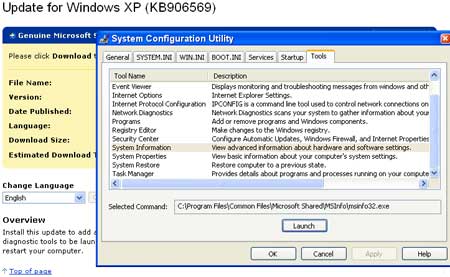
Here is a listing and where to find these tools without the hotfix. Just type the location in your RUN box.
- About Windows – C:\WINDOWS\system32\winver.exe
Command Prompt – C:\WINDOWS\system32\cmd.exe
Event Viewer – C:\WINDOWS\system32\Eventvwr.msc
Internet Options – C:\WINDOWS\system32\inetcpl.cpl
IPconfig – C:\WINDOWS\system32\cmd.exe /k C:\WINDOWS\system32\ipconfig.exe
Network Diagnostics – C:\WINDOWS\system32\netsh.exe diag gui
Add/Remove Programs – C:\WINDOWS\system32\appwiz.cpl
Regedit – C:\WINDOWS\regedit.exe
Security Center – C:\WINDOWS\system32\wscui.cpl
System Information – C:\Program Files\Common Files\Microsoft Shared\MSInfo\msinfo32.exe
System Properties – C:\WINDOWS\system32\sysdm.cpl
System Restore – C:\WINDOWS\system32\restore\rstrui.exe
Task Manager – C:\WINDOWS\system32\taskmgr.exe
If you do want this hotfix, you can download it from Microsoft.



