

When editing documents for others, the Comments feature of Word can be useful. However, the small black-on-red text is difficult to read. The instructions in this tutorial can be used to change the appearance of the comments.
Below is an example of how small comments are in Word. Many people may find it hard to read them without zooming the document up.

Luckily, it is possible to change the font face and the size of the comments like below:

Word 2010 and 2013:
1. Launch Word and open the document that you want to change the font face and size of comments.
2. When the document is loaded, press Ctrl + Alt + Shift + S to bring up the Style window.
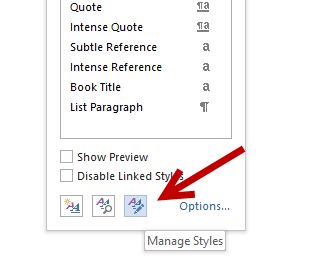
3. In the Style window, click the Manage Styles button at the bottom to continue.
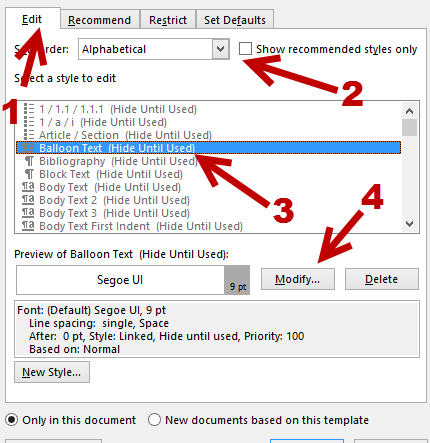
4. In the Manage Styles window, make sure that you are viewing the Edit tab. Find the Balloon Text option in the Select a style to edit list. If you find it hard to find the option, sort the list in the alphabetical order, you will be able to find it at the very top. With the selected option, click Modify.
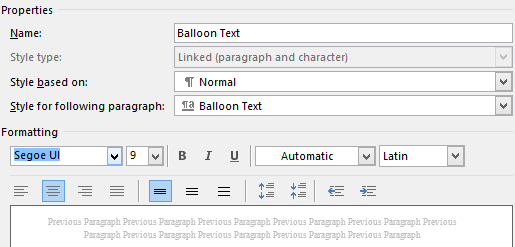
5. Change the font and the size of the comments in the new window. In addition to that, there are other format options like bold, italic, or underline font, as well as alignment and spacing options
6. Once you have done tweaking, click OK -> OK to save the changes and dismiss the windows. The comments in your document will be updated to reflect the changes automatically.
Older versions:
To change the Comments’ font style in Microsoft Word, use the steps below:
1. Open Word.
2. Click the Format menu.
3. Click Styles and Formatting.
4. At the bottom of the Formatting sidebar is a dropdown box. Select custom for this dropdown.
5. Check Balloon Text. (Not Comment Text)
6. Click OK.
7. Select Balloon Text in the Formatting sidebar.
8. Click Modify.
9. Now, you can select the font face, style, and color you want for your comments.
10 Click OK.



Generally I don’t learn post on blogs, but I wish to say that this write-up very
forced me to take a look at and do so! Your writing style
has been amazed me. Thanks, quite nice post.
Incredible! This blog looks just like my old one!
It’s on a entirely different topic but it
has pretty much the same page layout and design.
Wonderful choice of colors!