

Manipulating how the time and date is displayed within Windows is one of the first things that users tweak after installing the OS. This article describes in detail how to adjust the time and date format in Vista and Windows 7. This includes changing to 24-hr military time and displaying leading zeros.
Please note that the System Tray clock is displayed as Long Time and the date is displayed as Short Date.
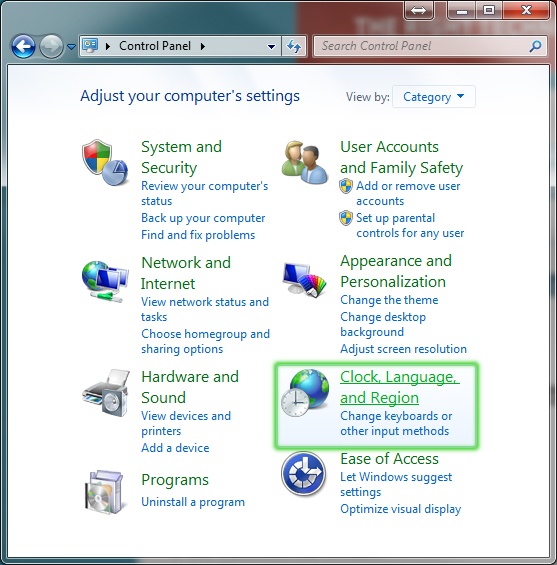
Open the Control Panel and click Clock, Language, and Region.
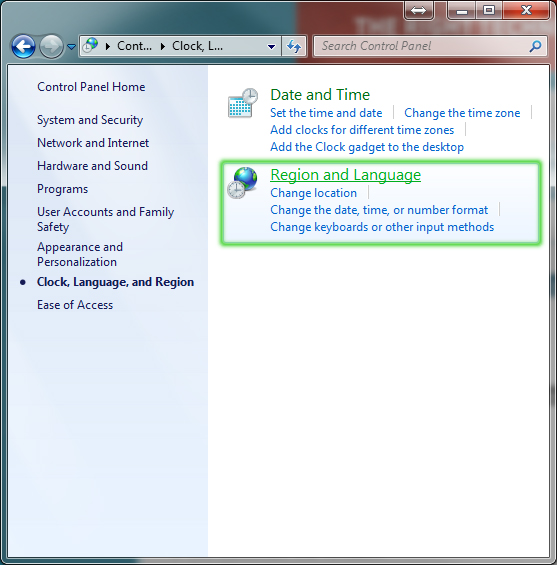
Click Region and Language.
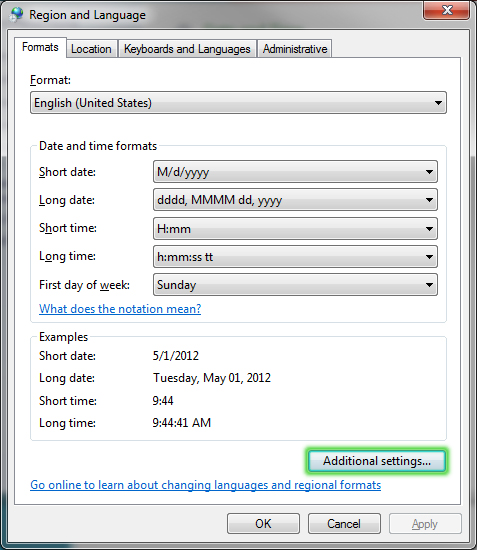
Here, you can choose from a set of predefined time and date formats. See below for more about what the “M, dd, etc.” mean. If the presets aren’t quite up to par with the format you’re looking for, click Additional Settings.
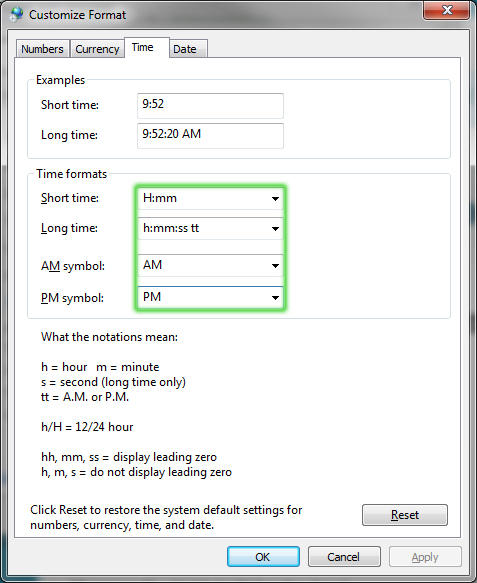
Click the Time tab at the top. You can now type in a format to your suiting in the Time Formats boxes.
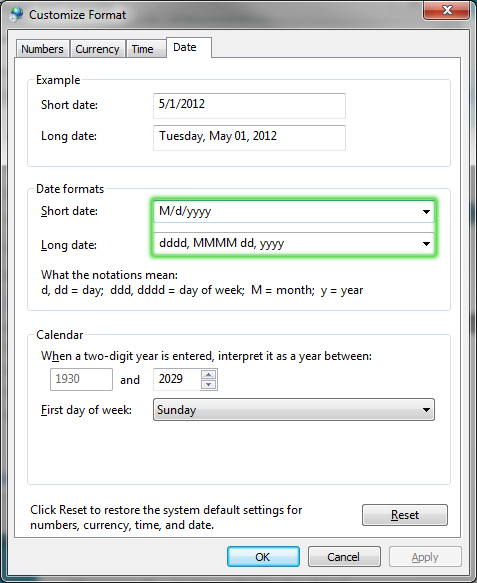
Click the Date tab at the top. You can type in a format to your suiting in the Date formats boxes.
Make sure to click OK once you’ve changed all of your settings.
Date Formats:
- M: A capital M denotes the month, without leading 0’s.
- MM: Two capital M’s denotes the month, with leading 0’s.
- MMM: Three capital M’s denotes the month, in text form to be displayed as the short date. (i.e. May instead of 5 or 05)
- MMMM: Four capital M’s denotes the month, in text form to be displayed as the long date.
- d: A lowercase d denotes the day of the month, without leading 0’s.
- dd: Two lowercase d’s denotes the day of the month, with leading 0’s.
- dddd: Four lowercase d’s denotes the day of the month, in text form to be displayed as the long date. (i.e. Tuesday)
- yy: Two lowercase y’s denotes the year, only displaying the last two digits of the year, with leading 0’s. (i.e. 2001 would be 01; 2012 would be 12)
- yyyy: Four lowercase y’s denotes the year, using all four digits of the year. (i.e. 2012)
Time Formats:
- H: A capital H denotes the hour of the day, in 24-hour time, without leading 0’s.
- HH: Two capital H’s denotes the hour of the day, in 24-hour time, with leading 0’s. (i.e. 9:00 am would be 09:00, or “O 900 hours”)
- h: A lowercase h denotes the hour of the day, in 12-hour time, without leading 0’s.
- hh: Two lowercase h’s denotes the hour of the day, in 12-hour time, with leading 0’s.
- mm: Two lowercase m’s denotes the minute of the hour, with leading 0’s. Minutes cannot be formatted to not have leading 0’s.
- ss: Two lowercase s’s denotes the second of the minute, with leading 0’s. Seconds cannot be formatted to not have leading 0’s.
- tt: Two lowercase t’s denotes the AM/PM marker. tt will display AM/PM respectively.
Example: Military Time With Leading Zeroes
If I wanted my clock to be displayed as 24-hour military time WITH leading zeroes, the minutes, the seconds AND the meridian marker, here is the format I would use:
HH:mm:ss tt





