Mozilla Firefox tutorials
Firefox 3.1: How to Enable the TraceMonkey JavaScript Engine
Contributed by shamanstears on October 14, 2008 under Mozilla FirefoxTraceMonkey is the magic pill that makes the new Firefox much quicker. Unfortunately, the beta version has this feature disabled. By changing the value of a couple of configuration settings, you can easily enable TraceMonkey and enjoy its speedy goodness.
Comments
Firefox 3: Disable Installation Delay of Extensions
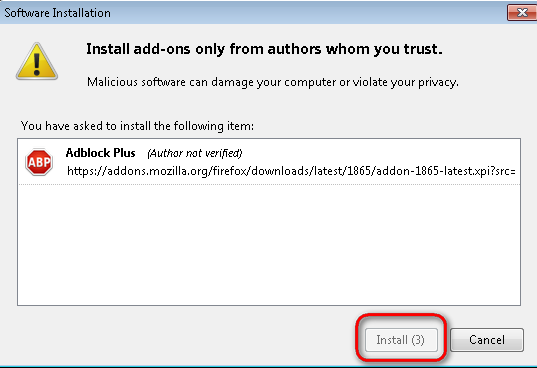
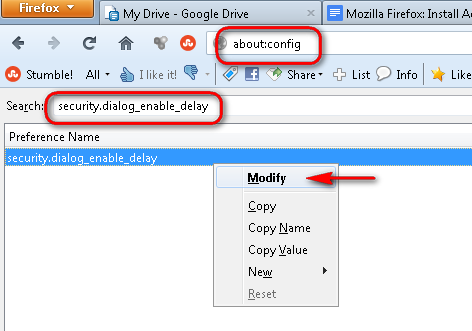
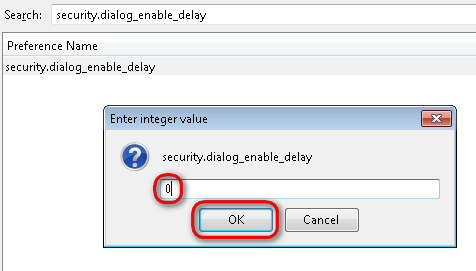
Contributed by shamanstears on October 5, 2008 under Mozilla FirefoxIf you install Firefox extensions (who doesn’t?), then you are very familiar with the ghosted Install button with the countdown that requires your to wait for it to say Install Now. You can disable this and have immediate access to the Install Now button by altering the default configuration of your Firefox browser.
CommentsFirefox 3: Access Your Gmail Inbox from the Bookmarks Toolbar via Live Bookmarks
Contributed by shamanstears on June 30, 2008 under Mozilla FirefoxUse Firefox’ 3’s Live Bookmarks and the RSS feed for your Gmail Inbox to get easy access to your incoming email from the Bookmarks Toolbar.
CommentsFirefox 3: Allow Windows to Swap Memory When Application is Minimized
Contributed by shamanstears on under Mozilla FirefoxIf you keep having problems with Firefox eating up too much memory, you can add a preference that will allow Windows to swap out memory when the application is minimized.
CommentsFirefox 3: Change the Automatic Update Rate of Live Bookmarks
Contributed by shamanstears on under Mozilla FirefoxBy default, Firefox reloads Live Bookmarks every 60 minutes. If this is not frequent enough for your needs, you can change the update rate by adding an unlisted preference to about:config.
Comments Firefox 3: Honor System Settings for Anti-Aliasing Smaller Text (OS X only)
Contributed by shamanstears on June 24, 2008 under Mozilla FirefoxBy default, Firefox 3 uses anti-aliasing on all rendered text, regardless of the text size. However, you may want Firefox to follow the OS X system preference of turning off the anti-aliasing of smaller sized text to improve how it is displayed on your screen.
CommentsFirefox 3: Shrink the Over-sized Back Button
Contributed by shamanstears on under Mozilla FirefoxOne thing I dislike about Firefox 3 is that the specialized themes for Windows XP and Vista both leave you with a Back button that is out of proportion with the other buttons on the toolbar. You can tame the oversized button by following this Tech-Recipe.
CommentsPOPULAR RECIPES
- How to Install new themes (jar files) in Firefox
- Mozilla Firefox: View Installed Plugins, Cache Information, and Advanced Config
- Firefox 2: Prevent Automatic Image Resizing and View Actual Size
- OS X: Install Firefox 2 and Firefox 3 on the Same Computer
- Firefox 2.0: Change Tab Close Buttons (X)
- Firefox: Open Search Results in New Tab
- Clear Your Private Data After Every Browser Session?
- How to Speed Up Firefox
- View our Top Tens
TECH-RECIPES BLOGS
- you're doing it wrong! (rant)
- thoughts of a launch psp owner (post 4 1/2 years)
- Facebook FishVille Cheat: Send Multiple Free Gifts to Your Neighbors
- post release: Windows 7, homegroups and me
- fall 2009 and some geek thoughts, reflections
- Facebook Cafe World Cheat: Close Your Cafe When You are Away for Long Periods of Time (to preserve your Buzz Rating)
- Facebook Cafe World Cheat: Serve Your Customers Instantly
- Facebook Cafe World Cheat: Send Multiple Free Gifts to Your Neighbors