

As AirPlay enabled receivers and speakers become more popular, users are searching for ways to send popular online streaming music services to these devices. Here is our review of the Musicality and Muse applications for streaming from your Mac via AirPlay
Despite having a large music collection, I frequently use Pandora or Grooveshark instead. However, as I have several Apple TVs and AirPlay enabled devices, I was disappointed to realize there was no included method for streaming these audio sources via AirPlay. Certainly, at some point, Apple will enable AirPlay through Safari, but it is not enabled yet. The best solution I have found are the Musicality and Muse applications from Industrious One.
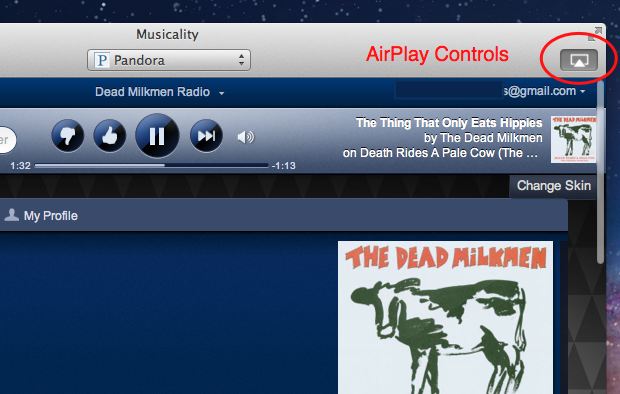
These apps are essentially inexpensive AirPlay enabled shells for these streaming music services. Musicality will stream Pandora, Grooveshark, and Last.fm services. The less expensive Muse streams Pandora only. Otherwise, the applications are essentially the same.

Selecting the different services in Musicality is accomplished through a dropbox box at the top of the application. Muse is Pandora only.

If you are familiar with the online versions of the music services, you will instantly comfortable using Musicality or Muse. These applications look exactly like the online versions with one important exception — the AirPlay controls. Even if you have several AirPlay devices as I do, you can easily control which ones are enabled and set the various volume controls. It is the exact same AirPlay control as iTunes so it should be familiar to most users.
Being in an external application and separated from your browser has many other advantages as well. For example, as each new song plays, a nice little notification is displayed in the corner of your desktop. Sadly, this title and track information is not yet transmitted to the AirPlay display.

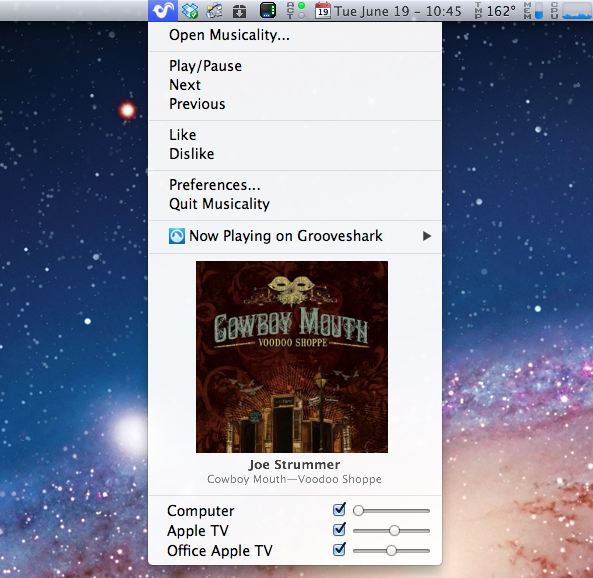
The application can be run completely hidden as a service. Most users, however, will really appreciate accessing the application and the majority of the controls through the menu bar. AirPlay control, voting, and song skipping can all be accessed through the drop down menu.
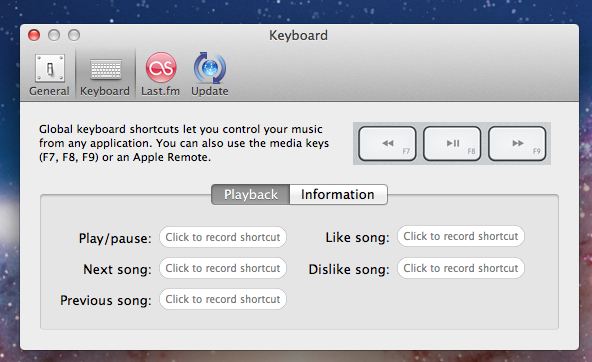
Additionally, another advantage of having a separate application is that setting hotkeys to control the common tasks such as voting or skipping to the next song is painless. This can be accomplished through the Preferences.
As an aside, I contacted Jason Perkins regarding an issue (actually an App Store problem) when I first discovered his program. He immediately got back to me and was already in the process of tweaking the application to eliminate the issue I found. A developer that is so accessible to his customers is always a great thing to support. And, yes, I had Pandora streaming to three rooms and my backyard during the creation of this review.
All reviews on tech-recipes are unbiased and honest. Nobody was paid or compensated for this review.





